By Muhammad Shahbaz
When I started working on p4product.com, one of the first technical things I wanted to get right was the sitemap. Without a proper sitemap, search engines have a harder time finding and understanding all the pages on a site. I had already published several posts and important pages like About Us and Contact Us, so I decided it was time to create a clean sitemap and submit it properly.
Creating the Sitemap
I generated the sitemap.xml file for the site. The file listed all the main URLs, including the homepage, the feed, the comments feed, the About Us page, the Contact Us page, and the individual blog posts.
Here is what the sitemap.xml looked like when I opened it:
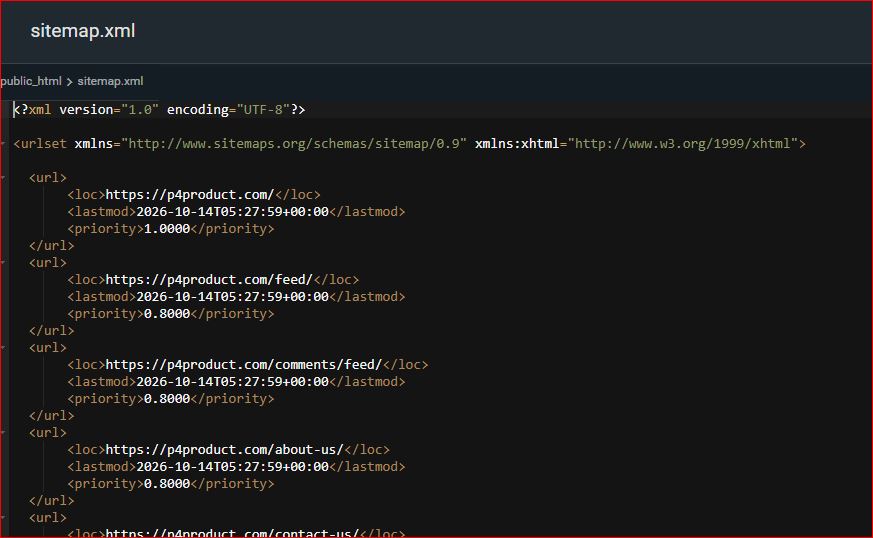
The homepage was given the highest priority of 1.0. Other pages such as the feed, comments feed, About Us, and Contact Us were set at 0.8. All the lastmod dates were around 14 October 2026, which matched the time I generated the file.
Having this structured list made it clear which pages the site currently had and how they were organized.
Uploading the Sitemap in hPanel
After creating the file, the next step was to place it on the server so that it would be publicly accessible. I logged into the Hostinger hPanel and uploaded the sitemap.xml file to the correct location in the public_html folder. Once it was uploaded, the file became available at:
https://p4product.com/sitemap.xml
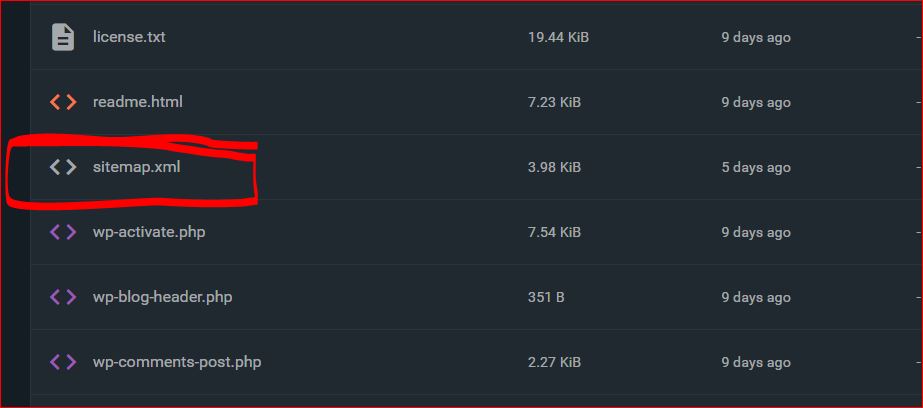
I opened the link in the browser to confirm that the file was loading correctly and that all the URLs were showing up as expected. This step is important because if the file is not reachable, Search Console will not be able to read it later.
Submitting the Sitemap in Google Search Console
With the sitemap live on the server, I went to Google Search Console. I opened the Sitemaps section and submitted the URL:
https://p4product.com/sitemap.xml
I submitted it on 14 October 2026. Over the next few days I kept checking the status. On 18 October 2026, Search Console showed that it had successfully read the sitemap.
Here is the exact result from the Submitted sitemaps page:
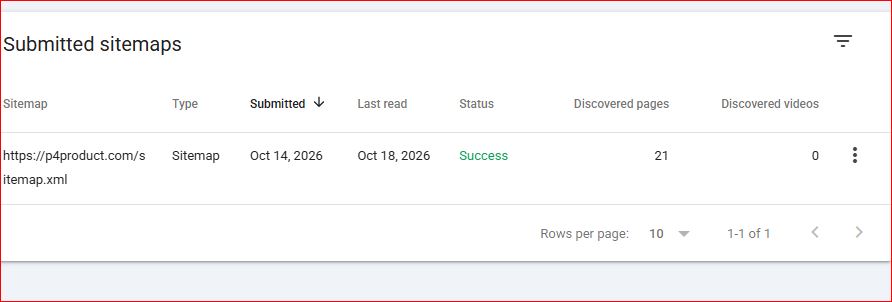
The status was marked as Success in green. Search Console had discovered 21 pages and 0 videos. This confirmed that Google was able to read the file and find the pages listed inside it.
Why This Step Matters
A sitemap does not guarantee that every page will be indexed, but it does make the process smoother. It gives search engines a clear map of the important URLs on the site. When the status shows Success and the number of discovered pages matches what you expect, it is a good sign that the basic technical foundation is in place.
In my case, seeing 21 discovered pages felt reassuring. It meant the main pages and posts were being recognized. I still monitor the Coverage and Pages reports regularly to check if any important URLs are missing or have errors, but the successful sitemap submission removed one potential obstacle.
What I Learned From This Process
Creating the sitemap was straightforward, but the real work was making sure the file was correctly placed on the server and then confirming that Search Console could read it without errors. Many people generate a sitemap and forget to check whether it is actually accessible or whether Search Console has processed it successfully.
I also made sure the lastmod dates were accurate and that the priority values made sense. The homepage should usually have the highest priority, while supporting pages can sit a bit lower.
Simple Checklist for Submitting a Sitemap
- Generate a clean sitemap.xml that includes all important pages
- Upload the file to the root of your site (usually public_html) so it is available at yourdomain.com/sitemap.xml
- Open the URL in a browser to confirm the file loads correctly
- Go to Google Search Console → Sitemaps and submit the full URL
- Wait a few days and check the status
- Confirm that the status shows Success and that the number of discovered pages looks reasonable
- Keep an eye on the Pages report afterwards for any coverage issues
Getting the sitemap submitted and marked as successful is one of those quiet technical steps that does not look exciting, but it helps search engines understand the structure of the site. In my case, going from creating the file to seeing the green Success status in Search Console took only a few days, and it gave me confidence that the basic indexing path was open.
Leave a Reply