By Muhammad Shahbaz
A short while ago I noticed that traffic on p4product.com had dropped without any clear reason. New pages were not getting indexed as quickly as before, and the usual crawl activity in the hosting logs looked strange. When I checked the security and AI audit section, the problem became obvious.
What the Audit Showed
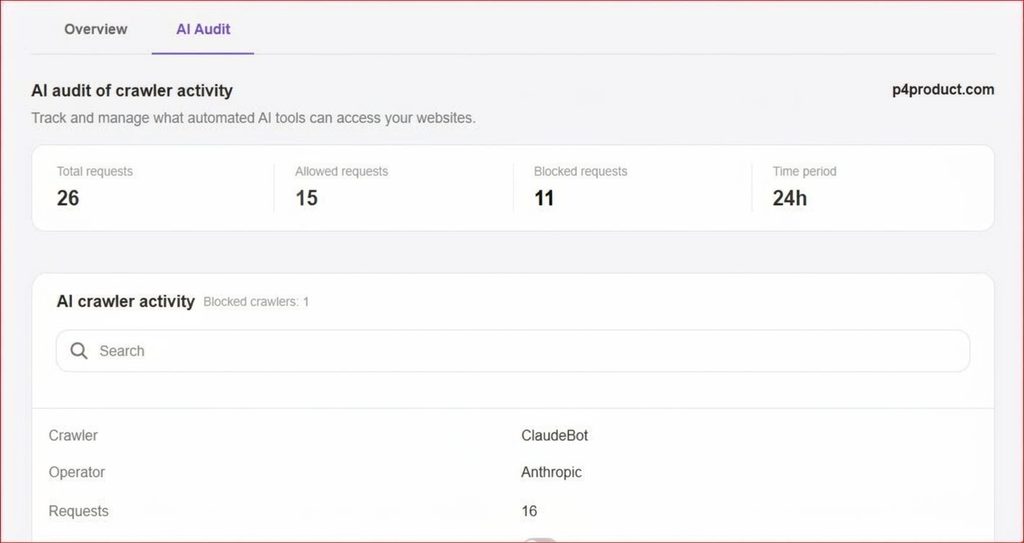
AI Audit dashboard showing 11 blocked crawler requests out of 26 total requests on p4product.com
How I Fixed the Problem
The audit showed that out of 26 total crawler requests in 24 hours, 11 were being blocked. Only 15 were allowed through. One of the blocked bots was ClaudeBot. The firewall had become too strict and was treating normal indexing traffic as a threat.
I made three careful changes so that real crawlers could reach the site again without opening the door to actual attacks.
First, I adjusted the firewall user-agent rules. I removed the blanket block that was stopping AI and indexing bots. Instead of blocking entire categories, I made the rules more specific so only clearly harmful traffic would be stopped.
Second, I updated the robots.txt file. I made sure legitimate crawlers were allowed to access the important parts of the site while still keeping sensitive directories protected.
Third, I changed the rate-limiting settings. Rather than completely blocking non-browser requests, I set reasonable limits. This way genuine crawlers could do their work without being cut off, while sudden floods of requests would still be controlled.
The Result After the Changes
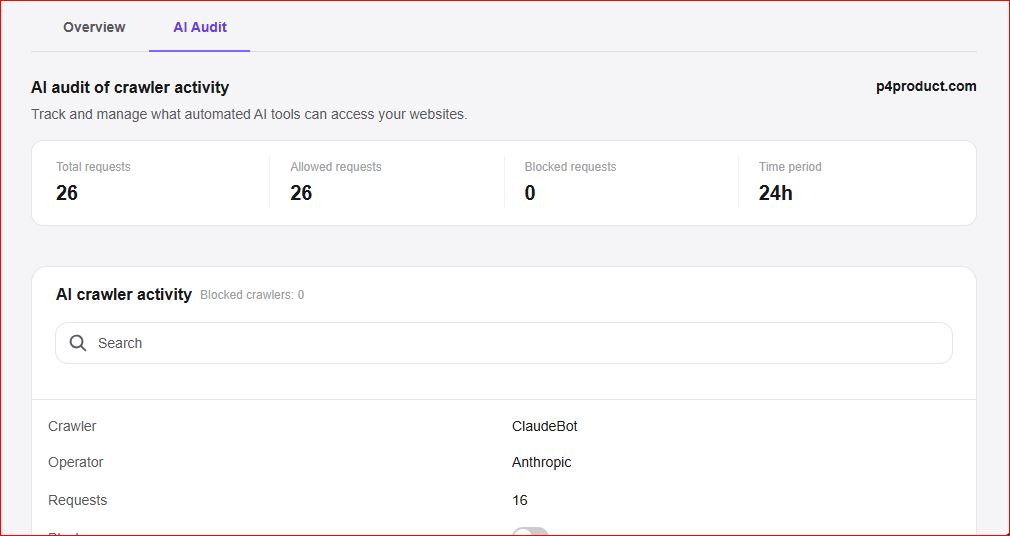
AI Audit dashboard showing zero blocked crawler requests and 26 allowed requests on p4product.com
I ran the audit again over the same 24-hour window. This time all 26 requests were allowed. The blocked count dropped to zero. ClaudeBot and other legitimate crawlers were able to access the site without any issue.
The change was visible in the logs within a day. Indexing activity returned to normal and the unusual crawl errors disappeared.
Why This Matters
Search engines and AdSense both rely on crawlers to understand a site. If those crawlers keep receiving blocked responses, the site can appear incomplete or poorly maintained. Pages may take longer to get indexed, and technical reviews can face unnecessary delays. At the same time, security still needs to stay in place. The goal is not to open everything, but to stop treating normal crawlers as threats.
Simple Checklist You Can Use
- Check your firewall or security logs every few weeks to see if legitimate bots are being blocked.
- Avoid broad user-agent bans. Be more precise with the rules.
- Keep robots.txt clean and test it in Google Search Console.
- Watch the ratio of allowed versus blocked requests. A sudden rise in blocks is usually a sign that the rules need adjustment.
In my case the fix took less than thirty minutes, but it restored normal crawl access and removed an invisible barrier that was affecting the site. If your traffic or indexing has slowed down without an obvious content reason, checking the crawler blocks is one of the first places worth looking.
Leave a Reply