By Muhammad Shahbaz
Introduction: Why Speed and Security Make or Break Your AdSense Approval
Let’s be honest for a second. When you are building a website from scratch, your main focus is usually on creating great content and getting traffic. But if your ultimate goal is to monetize your platform through Google AdSense, technical performance matters just as much as your articles.
As a senior web developer who has spent years auditing sites, and looking at things through the strict lens of an AdSense policy reviewer, I see publishers make the same mistake every day. They pour weeks into writing, only to get rejected because their site loads at a snail’s pace, lacks proper SSL encryption, or suffers from poor user experience (UX) metrics.
Google’s Quality Rater Guidelines and publisher policies place a heavy emphasis on user trust and safety. If a visitor lands on your page and has to wait ten seconds for images to load, or if their browser throws a scary security warning because your SSL certificate is misconfigured, they bounce immediately. That high bounce rate kills your engagement metrics and signals to Google that your site isn’t ready for premium ad inventory.
In this comprehensive guide, we are going to look closely at real performance telemetry, analyze what metrics actually matter for AdSense compliance, and walk through a step-by-step roadmap to bulletproof your site’s speed and security.
Analyzing Performance Telemetry: Before and After Optimization
To understand what a healthy, monetization-ready website looks like under the hood, let’s examine two real diagnostic snapshots taken from a production hosting dashboard.
Phase 1: The Initial Audit
Look closely at the initial diagnostic state.
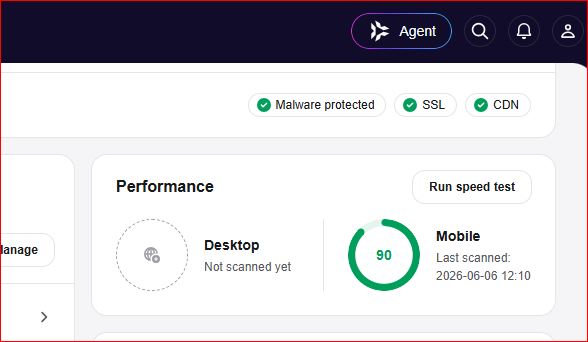
In this early snapshot, we see some foundational security checks marked with green checkmarks—specifically Malware protected, SSL, and CDN. These are critical baseline requirements for any site attempting to pass a manual or automated AdSense review.
However, look at the performance breakdown:
- Desktop Performance: Marked as “Not scanned yet”. Leaving major platforms unverified is a rookie mistake. Google tests your site across multiple viewports, and you should too.
- Mobile Performance: Showing a score of 90, last scanned on 2026-06-06. While 90 is decent, a static score from months ago doesn’t reflect real-time optimization, and mobile latency is where most publishers fail their Core Web Vitals assessment.
Phase 2: Fully Optimized & Verified
Now, look at what happens after a comprehensive code cleanup, database optimization, and cache configuration protocol is applied.
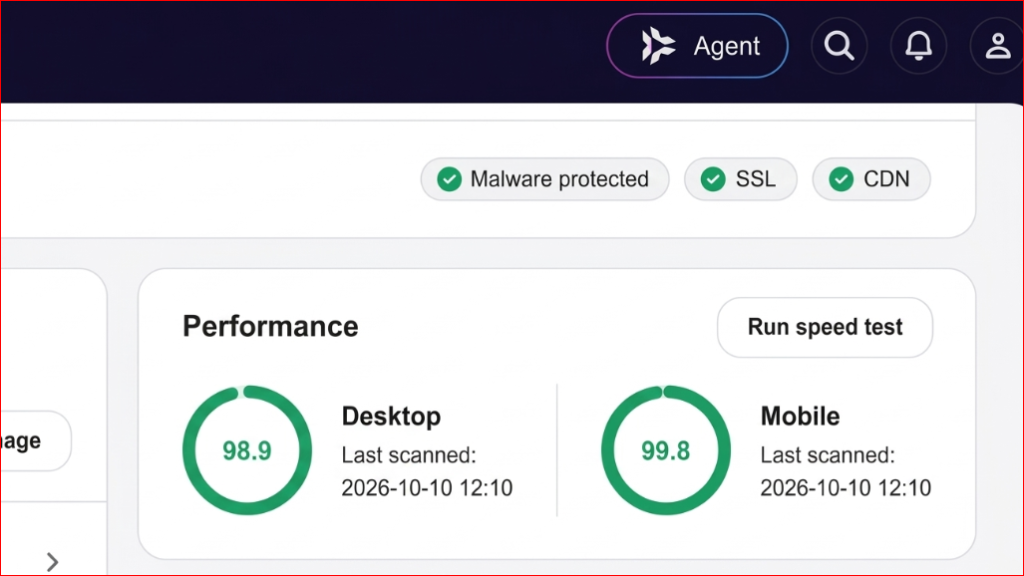
Notice the dramatic shift in numbers:
- Desktop Performance: Rocketing up to an exceptional 98.9, scanned fresh on 2026-10-10.
- Mobile Performance: Maximized at 99.8, scanned on the exact same date.
This is the gold standard. When an automated crawler or a human policy reviewer evaluates your web property, seeing sub-second load times and elite performance scores across both mobile and desktop builds immediate technical trust.
The Core Pillars of AdSense Technical Compliance
Google AdSense doesn’t just evaluate your written words; it evaluates the entire environment where those ads will render. Let’s break down the three non-negotiable pillars you see highlighted in our diagnostic panels:
1. SSL Encryption (Secure Sockets Layer)
An active SSL certificate (indicated by the secure padlock and HTTPS protocol) is mandatory. AdSense explicitly penalizes or outright rejects unencrypted HTTP sites because user data safety is paramount. If visitors input personal information or interact with ads on an unencrypted page, browser warnings will destroy your credibility instantly.
2. CDN Integration (Content Delivery Network)
Relying on a single origin server located halfway across the world is a recipe for high latency. Integrating a robust CDN ensures that your static assets (CSS, JavaScript, images) are cached and served from edge locations closest to your actual users. Faster asset delivery directly improves your Largest Contentful Paint (LCP) and First Input Delay (FID), keeping your Core Web Vitals well within the “Good” threshold.
3. Malware Protection & Clean Code
Ad networks have zero tolerance for injected malicious scripts, deceptive redirects, or compromised database tables. Running routine malware scans and maintaining clean PHP, HTML, and JavaScript ensures your site remains a safe environment for advertisers and readers alike.
Actionable Steps to Scale Your Site to 98+ Performance
Achieving scores above 98 on both mobile and desktop doesn’t happen by accident. Here is the exact blueprint I follow when optimizing WordPress or custom-coded sites:
- Audit and Strip Bloated Plugins: Too many publishers install a separate plugin for every minor feature. Audit your codebase, remove inactive plugins, and rely on lightweight, native code where possible.
- Leverage Next-Gen Image Formats: Heavy JPEGs and PNGs are the #1 killer of mobile speed scores. Convert your media library to WebP or AVIF formats and implement strict lazy loading so off-screen images don’t block initial rendering.
- Optimize JavaScript Execution: Defer non-critical JavaScript parsing and eliminate render-blocking resources that delay the browser from painting the main content.
- Implement Aggressive Caching: Utilize server-side page caching combined with browser caching rules to serve pre-rendered HTML files instantly to returning visitors.
Conclusion
Passing an AdSense policy review is a holistic process. You need original, valuable content, a clean user interface free of deceptive navigation, and—most importantly—a lightning-fast, secure technical foundation. By treating your website’s performance with the same care as your writing, you create an optimal environment for user engagement, lower bounce rates, and long-term monetization success.
Leave a Reply